GitHub Copilot Customization Explained for Beginners: Instructions, Prompt Files, Skills, Agents, and Hooks Introduction If you've recently started using GitHub Copilot, you've probably come across terms like Instructions , Prompt Files , Skills , Agents , and Hooks . At first glance, they all seem to do the same thing—they tell Copilot what to do. So why does GitHub have five different customization features? The answer is simple: each feature solves a different problem. Think of GitHub Copilot as a new developer joining your team. On their first day, you don't just hand them code. You explain your coding standards, give them reusable templates, teach them specialized knowledge, assign them a role, and automate repetitive tasks. That's exactly how GitHub Copilot customization works. In this article, you'll learn what each feature does, when to use it, and how they all work together. By the end, you'll know which feature to start with and which ones can wait un...
Posts
How to Lock your Azure Resources?

Azure Resource Locking feature helps to prevent deletion and modification of Azure Resources on which the lock is been applied. Now you might be wondering how it's different and advantages compared to Azure RBAC (Role-Based Access Control)? RBAC is used as the first line of defense against restricting access to Azure Resources. Using RBAC you can restrict access to resources and resource actions. RBAC alone will not be sufficient across all environments especially from the Test environment onwards. RBAC and Resource lock doesn't conflict with each other rather they complement and should be applied as standard practice/pattern across all your Azure Subscriptions in your organization. Assume you are an Administrator, which means you have full access to all your resources. With Resource Lock applying it provides a way for administrators to lock down Azure resources to prevent deletion and modification of a resource. Resource lock applies to all users regardless of their roles. Th...
Authenticate Azure Functions - API Keys

In this blog post, we will see one of the ways to secure your Azure Functions using API keys. Security plays a key role as part of SDLC (Software Development Life Cycle) doesn't matter whether it's exposed to the client/public or even if it's internal. There are multiple ways to secure your Azure Functions like API Keys, Certificate, API Mgmt, App Service Authentication, etc. If you are new to the Cloud and Azure Functions but want to make a start with minimal effort and less setup of Infrastructure, then API Keys is the ideal choice. Azure Functions allows you to secure HTTP-triggered functions by API access key in the request. As part of creating new Azure Functions, we can select the Authorization Level enum value. If we set the Authorisation level to Anonymous, no security applied which means no authentication applied for the endpoint. Authorization Level - Function By setting the Authorisation level to Function each Azure Functions require a specific API key to Au...
Azure Container Registry Image Scanning With Azure Security Center

Just to recap in the previous blog post we looked into how to secure Azure Container Registry and in this post will see the offering from Azure Security Center. Azure Container Registry (ACR) is a manged, private container registry service in Azure to build, store, and manage container images and artifacts. ACR service based on the open-source Docker Registry 2.0. This post explains, what you get from Azure Security Center in the context of ACR. Image scanning is important for any Docker registry. Vulnerability scanning for images stored in Azure Container Registry is now generally available in Azure Security Center (March 2020). This capability is powered by Qualys and seamlessly integrated into the Azure Security Center. ACR image scanning requires Azure Security Center Standard tier . When you push an image to Container Registry, Security Center automatically scans it, then checks for known vulnerabilities in packages or dependencies defined in the file. Each scan tak...
How to secure Azure Container Registry?
Azure Container Registry (ACR) is a managed, private Docker registry service that stores and manages your container images in Azure. Below are the few recommendations for using Azure Container Registry. Image scanning with Azure Security Center With Azure Security Center, you can get automatic scans of your registries for any threats and vulnerabilities of the images. Note if you're on Azure Security Center's standard tier, you can add the Container Registries bundle. This feature is charged per image scan. Whenever an new image is pushed to your registry, Security Center automatically scans that image. Azure Security Center also provide options or recommendations for resolving those vulnerabilities. Enable Content Trust Azure Container Registry implements Docker's content trust model, enabling pushing and pulling of signed images. Content trust helps to verify the source and integrity of the images, ensuring that they are the images we expect. As an im...
Announcements related to Azure Blob Storage
As part of Microsoft Build conference (may 2020) and from early this year few key announcements were made related to Azure Blob Storage. In this blog post will try to cover few key announcements which are now generally available and some in preview. User Delegation SAS Tokens (Generally Available) This feature was made GA in January 2020. Prior to User Delegation SAS token feature, if we want to access private or secured container it's managed through Managed Identity or Shared access signature token (SAS tokens) . SAS tokens grant specific, time-limited access to storage objects without exposing an account access key. A SAS secured with Azure AD credentials is called a user delegation SAS. With user delegation SAS tokens it now supports Azure AD and RBAC, what it means is now lower-privileged users and services can now delegate subsets of their access to clients, using this ...
Customer-Managed Keys for Azure CosmosDB & Container Registry

In May 2020, as part of Microsoft Build conference few key announcements were made for Microsoft Azure service. In this blog post, I will be covering updates related to Customer-managed keys which were made GA for Azure service - CosmosDB and Azure Container Registry. What is Customer-managed key? By default various resource provider in Azure implement encryption at Rest. Implementation of this encryption at Rest by default will be using Service-Managed keys which Microsoft manages internally. But in few scenarios users/customers want to control this keys that's where customer-managed key comes into picture. Two Azure service which we are talking in this post now have this capability (GA). Note : You must store customer-managed keys in Azure Key Vault Customer-managed key for CosmosDB Customer-managed keys enables users to take total control over the keys used by Azure Cosmos DB to encrypt their data at rest. With CosmosDB your data is always encrypted with service-managed-k...
AZURE SQL - Advanced Threat Protection

In my last blog post, we looked at the Data Discovery & Classification , Vulnerability Assessment features within the Advanced Data Security (ADS) offering for Azure SQL. In this blog post, we will have a look into Advanced threat protection. Azure SQL Overview Azure SQL Database is a fully managed Platform as a Service (PaaS) Database Engine that handles most of the database management functions such as upgrading, patching, backups, and monitoring without user involvement. As with any database platform, security remains a top concern to address this issue or concerns Microsoft have offering called Advanced Data Security with Azure SQL service. Pre-requisites Enable Advanced Data Security (ADS) at the database level by navigating to Settings > Advanced Data Security for your SQL database and click Enable . Alternatively, ADS can also be configured and managed at the server level by navigating to Settings > Advanced Data Security for your server and switc...
AZURE SQL - Vulnerability Assessment
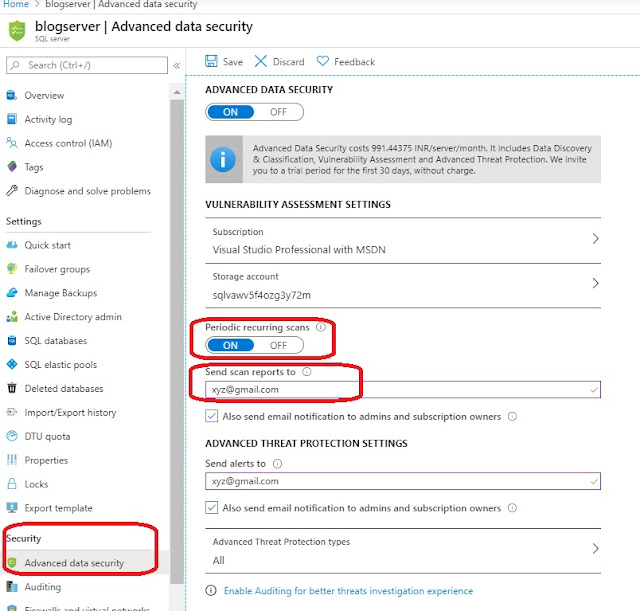
In my last blog post, we looked at the Data Discovery & Classification features within the Advanced Data Security (ADS) offering for Azure SQL. In this blog post, we will have a look into Vulnerability assessment. Azure SQL Overview Azure SQL Database is a fully managed Platform as a Service (PaaS) Database Engine that handles most of the database management functions such as upgrading, patching, backups, and monitoring without user involvement. As with any database platform, security remains a top concern to address this issue or concerns Microsoft have offering called Advanced Data Security with Azure SQL service. Pre-requisites Enable Advanced Data Security (ADS) at the database level by navigating to Settings > Advanced Data Security for your SQL database and click Enable . Alternatively, ADS can also be configured and managed at the server level by navigating to Settings > Advanced Data Security for your server and switching the ‘Advanced Data Security’ ...
AZURE SQL - DATA DISCOVERY & CLASSIFICATION
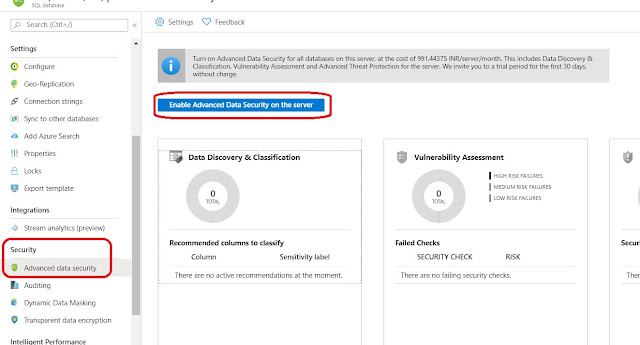
Azure SQL Overview Azure SQL Database is a fully managed Platform as a Service (PaaS) Database Engine that handles most of the database management functions such as upgrading, patching, backups, and monitoring without user involvement. As with any database platform, security remains a top concern to address this issue or concerns Microsoft have offering called Advanced Data Security with Azure SQL service. Pre-requisites Enable Advanced Data Security (ADS) at the database level by navigating to Settings > Advanced Data Security for your SQL database and click Enable . Alternatively, ADS can also be configured and managed at the server level by navigating to Settings > Advanced Data Security for your server and switching the ‘Advanced Data Security’ setting from ‘Off’ to ‘On’. AdventureWorksLT database will be used. Enable the Auditing settings to have complete investigation experience. Go to the Auditing blade and toggle Auditing switch from OFF to ON. Choose...