GitHub Copilot Customization Explained for Beginners: Instructions, Prompt Files, Skills, Agents, and Hooks Introduction If you've recently started using GitHub Copilot, you've probably come across terms like Instructions , Prompt Files , Skills , Agents , and Hooks . At first glance, they all seem to do the same thing—they tell Copilot what to do. So why does GitHub have five different customization features? The answer is simple: each feature solves a different problem. Think of GitHub Copilot as a new developer joining your team. On their first day, you don't just hand them code. You explain your coding standards, give them reusable templates, teach them specialized knowledge, assign them a role, and automate repetitive tasks. That's exactly how GitHub Copilot customization works. In this article, you'll learn what each feature does, when to use it, and how they all work together. By the end, you'll know which feature to start with and which ones can wait un...
Posts
Password Reset for Virtual Machine in Azure
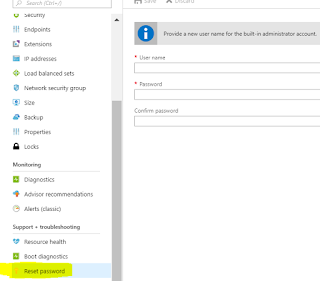
Reset password for Domain controller Virtual Machine The first thing you will likely try is the Reset Password option in the Azure portal. It does not work for Domain Controllers. In order to reset password for Domain controller below is the procedure Ø Go to the VM in the azure portal Ø Go into the extensions menu for that VM Ø In the top menu pick “Add” Ø Choose the Custom Script extension Ø Click Create Ø Pick your DCUser.ps1 script file, which is available below. Ø Click OK. Ø Wait for the extension to be deployed and run, once ran ensure you uninstall the extension as a best practice. PowerShell script for Password Reset for DC. Replace user name and password based on your requirement. DCPasswordReset.ps1 You can reset normal Windows virtual machine (VM) credentials in a few different ways, depending on your needs: Reset password using Azure Portal ...
Disable Azure function for v1 and v2

Disabling an Azure function has a bug in v1, which is fixed in v2. Below I have made an attempt to explain with both version how it works. Azure function v2 Enable or disable Azure function bug is fixed in Azure Function v2. Now things are driven through portal using the below setting Azure function v1 Recently we had an issue in Production application, due to business reason we had to stop one of the Azure functions. We used Azure function app service running on App service plan and function is Time triggered. We tried with option available in Azure portal under functions where it lists all the functions available in the App service plan with status as shown below. For the Azure function we wanted to stop, we chose Disable option. However, immediately we noticed that the function was still running, and the function monitor showed those further executions. Solution: Below are the 3 options Approach 1 : Requires code change where we...