GitHub Copilot Customization Explained for Beginners: Instructions, Prompt Files, Skills, Agents, and Hooks Introduction If you've recently started using GitHub Copilot, you've probably come across terms like Instructions , Prompt Files , Skills , Agents , and Hooks . At first glance, they all seem to do the same thing—they tell Copilot what to do. So why does GitHub have five different customization features? The answer is simple: each feature solves a different problem. Think of GitHub Copilot as a new developer joining your team. On their first day, you don't just hand them code. You explain your coding standards, give them reusable templates, teach them specialized knowledge, assign them a role, and automate repetitive tasks. That's exactly how GitHub Copilot customization works. In this article, you'll learn what each feature does, when to use it, and how they all work together. By the end, you'll know which feature to start with and which ones can wait un...
Posts
How to enable Automatic Guest OS Patching for Windows Azure VMs?

For any organization and project security plays a very important role, towards that Microsoft tries to simplify and eases the effort required by the customer or end-user. One such thing that they recently announced is Automatic Guest OS patching for windows Azure VMs which is now public preview. With Azure Automatic Guest OS patching enabled it helps update management by safely and automatically patching virtual machines to maintain security compliance. Here VMs are checked periodically for available operating system patches. Operating system patches classified as critical or security are automatically downloaded and applied on the VM. If VM is powered off during assessment by the platform for patching, VM will be automatically assessed during the next periodic assessment when it's turned on. Patches are applied within the 30 days of the monthly Windows update release. Automatic VM guest patching has the following capabilities: Patches classified ...
Password Reset for Virtual Machine in Azure
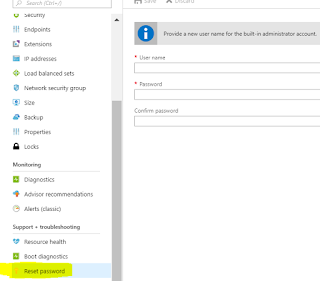
Reset password for Domain controller Virtual Machine The first thing you will likely try is the Reset Password option in the Azure portal. It does not work for Domain Controllers. In order to reset password for Domain controller below is the procedure Ø Go to the VM in the azure portal Ø Go into the extensions menu for that VM Ø In the top menu pick “Add” Ø Choose the Custom Script extension Ø Click Create Ø Pick your DCUser.ps1 script file, which is available below. Ø Click OK. Ø Wait for the extension to be deployed and run, once ran ensure you uninstall the extension as a best practice. PowerShell script for Password Reset for DC. Replace user name and password based on your requirement. DCPasswordReset.ps1 You can reset normal Windows virtual machine (VM) credentials in a few different ways, depending on your needs: Reset password using Azure Portal ...